I used to be that creator who just “winged it” every week.
I’d wake up Monday, panic because I hadn’t posted anything for my members yet, and throw together a half-baked PDF or a bonus video by noon. It wasn’t sustainable and honestly, my members deserved better. Everything changed when I created a simple content calendar.
Setting up a content calendar wasn’t just about being organized — it saved my sanity.
It also helped me show up more consistently, which kept my members engaged and reduced churn.
Whether you’re running a membership site for templates, training videos, coaching content, or even a digital library of resources, a content calendar is your best friend.
Here’s how I set mine up, in five ridiculously doable steps.
Step 1: Choose Your Content Themes
Before anything else, you need to decide what kind of content you’ll deliver.
When I first started, I was all over the place. One week was a tutorial, the next week was a quote. Total chaos. Once I picked a few repeating content themes — like “Tutorial Tuesday” or “Template Thursday” — everything clicked.
-
Choose 2–4 core themes (e.g., Q&A videos, templates, guides, challenges)
-
Align themes with your membership promise or niche
-
Rotate themes weekly or monthly for variety and consistency
This gives your content structure and keeps members from guessing what they’ll get next. If you’re not sure what to create, check out these 9 tips on creating exclusive content for members it’s a great starting point.
Step 2: Decide Your Content Frequency
Not gonna lie, I overpromised at first. “New content every day!” I said. It was a mistake.
You don’t need to publish daily. You just need to be consistent.
-
Weekly content drops work great for most membership sites
-
If you’re busy, biweekly or even monthly works — just stick to it
-
Let members know your content schedule from the start
Now I release one core piece of content every Tuesday and sprinkle in bonus content here and there. It’s manageable and reliable. If you’re still setting things up, I highly recommend starting with how to start a membership site in 9 simple steps to get your foundation right.
Step 3: Use a Simple Planning Tool
You do not need a fancy system to get this going.
When I started, I used a basic Google Sheet. Then I graduated to Notion. Now I use Trello with a content board broken down into: Idea Bank, Scheduled, In Progress, and Published.
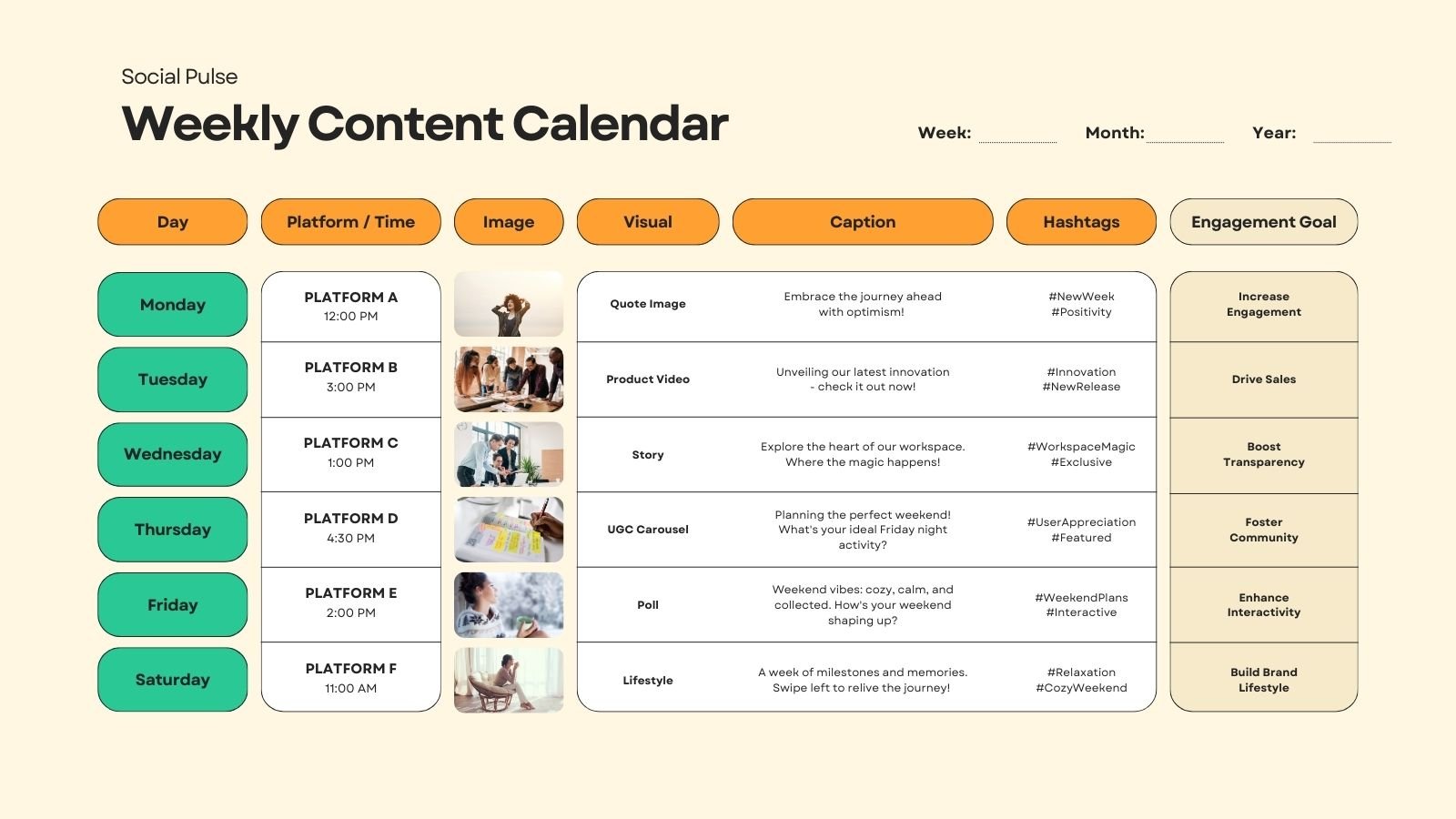
Here’s what to include in your calendar:
-
Content title or idea
-
Type (PDF, video, email, etc.)
-
Target publish date
-
Status (planned, scheduled, published)
-
Notes or links
If you love visuals, color code the themes or tags. Do whatever makes it easy for you to glance and say, “Cool, I know what’s coming up next week.” Need ideas on the right formats to include? This breakdown of the 6 best content types for membership sites will help a lot.
Step 4: Batch and Schedule Ahead
This step was a game-changer.
Instead of waking up in panic mode, I now batch 2–3 weeks of content in one sitting. I block out a few hours each Friday just to create, schedule, and upload inside my member area.
-
Use tools like Payhip, Podia, or Teachable to pre-schedule
-
Batch similar content together (write 3 PDFs in a row, or record 3 videos back-to-back)
-
Save time by reusing templates, intros, and assets
Even if you just stay 1 week ahead, that buffer takes the pressure off and gives you breathing room. If you’re not sure whether to drip that content or unlock it all at once, here’s a helpful guide on drip content vs all-access memberships.
Step 5: Get Feedback and Adjust
Here’s the secret most people skip: Ask your members what they want.
I started adding a simple poll every quarter asking:
-
What content they love most
-
What they wish I’d include more of
-
When they prefer content drops
Based on that feedback, I’ve fine-tuned my calendar. Less guesswork, more engagement.
-
Use Typeform, Google Forms, or even a quick email survey
-
Adjust your calendar based on real usage data and engagement
-
Don’t be afraid to drop what’s not working — this isn’t set in stone
And if you’re looking to level up retention and engagement even more, this guide on membership retention strategies is full of ideas you can stack with your calendar strategy.
Conclusion
Setting up a content calendar might sound boring but trust me, it’s the foundation of a successful membership.
It took me from stressed-out creator to consistent content machine. More importantly, it helped my members know what to expect, when to log in, and what value they’re getting. And that keeps them paying.
So don’t overthink it. Start with a spreadsheet. Pick a theme. Commit to a rhythm. You’ll thank yourself later.
Want a free content calendar template I use? Shoot me a DM — happy to share it.